
ROLE
Technical Designer, Producer
ROLE
Technical Designer, Producer
ROLE
Technical Designer, Producer
TOOL
Unity (C#), GitHub
TOOL
Unity (C#), GitHub
TOOL
Unity (C#), GitHub
TEAM
Solo
TEAM
Solo
TEAM
Solo
TIMELINE
7 Months
TIMELINE
7 Months
TIMELINE
7 Months
PLAY
PLAY
PLAY
OVERVIEW
OVERVIEW
Hiraishin is a first-person action game built around instantaneous teleportation, directly inspired by the Hiraishin jutsu used by Minato Namikaze in Naruto Shippuden (the ability allows him to teleport to any object that he has tagged). The core design was combining that fantasy with Ghostrunner-style fast movement and Portal-style physics interaction — teleportation done right is an absurdly overpowered ability, and the goal was to build a game where that power is the point: it lets players interact with enemies and objects in ways that reward creative thinking over memorized solutions.
Hiraishin is a first-person action game built around instantaneous teleportation, directly inspired by the Hiraishin jutsu used by Minato Namikaze in Naruto Shippuden (the ability allows him to teleport to any object that he has tagged). The core design was combining that fantasy with Ghostrunner-style fast movement and Portal-style physics interaction — teleportation done right is an absurdly overpowered ability, and the goal was to build a game where that power is the point: it lets players interact with enemies and objects in ways that reward creative thinking over memorized solutions.
Hiraishin is a first-person action game built around instantaneous teleportation, directly inspired by the Hiraishin jutsu used by Minato Namikaze in Naruto Shippuden (the ability allows him to teleport to any object that he has tagged). The core design was combining that fantasy with Ghostrunner-style fast movement and Portal-style physics interaction — teleportation done right is an absurdly overpowered ability, and the goal was to build a game where that power is the point: it lets players interact with enemies and objects in ways that reward creative thinking over memorized solutions.
NO SINGLE SOLUTION
NO SINGLE SOLUTION
Every challenge in every level, whether it's traversal, combat, or puzzle-solving, shouldn't have a fixed solution. Players should be able to improvise and overcome the challenges through their creativity.
Every challenge in every level, whether it's traversal, combat, or puzzle-solving, shouldn't have a fixed solution. Players should be able to improvise and overcome the challenges through their creativity.
SYSTEMS THAT COMBINE
SYSTEMS THAT COMBINE
Mechanics and systems should never be designed in isolation. They should be reusable and serve multiple purposes in the game. More importantly, they should allow for meaningful interactions between one system and another.
Mechanics and systems should never be designed in isolation. They should be reusable and serve multiple purposes in the game. More importantly, they should allow for meaningful interactions between one system and another.
SATISFACTION IN EXECUTION
SATISFACTION IN EXECUTION
Every player action, whether it is a teleport, or an execution, must be rewarding for the player. It helps convey the power that the character has and reinforce positive feedback.
Every player action, whether it is a teleport, or an execution, must be rewarding for the player. It helps convey the power that the character has and reinforce positive feedback.
DESIGN DEEP DIVE
DESIGN DEEP DIVE
#1: TELEPORTATION
#1: TELEPORTATION
#1: TELEPORTATION
OVERVIEW

Design Intent
Design Intent
Design Intent
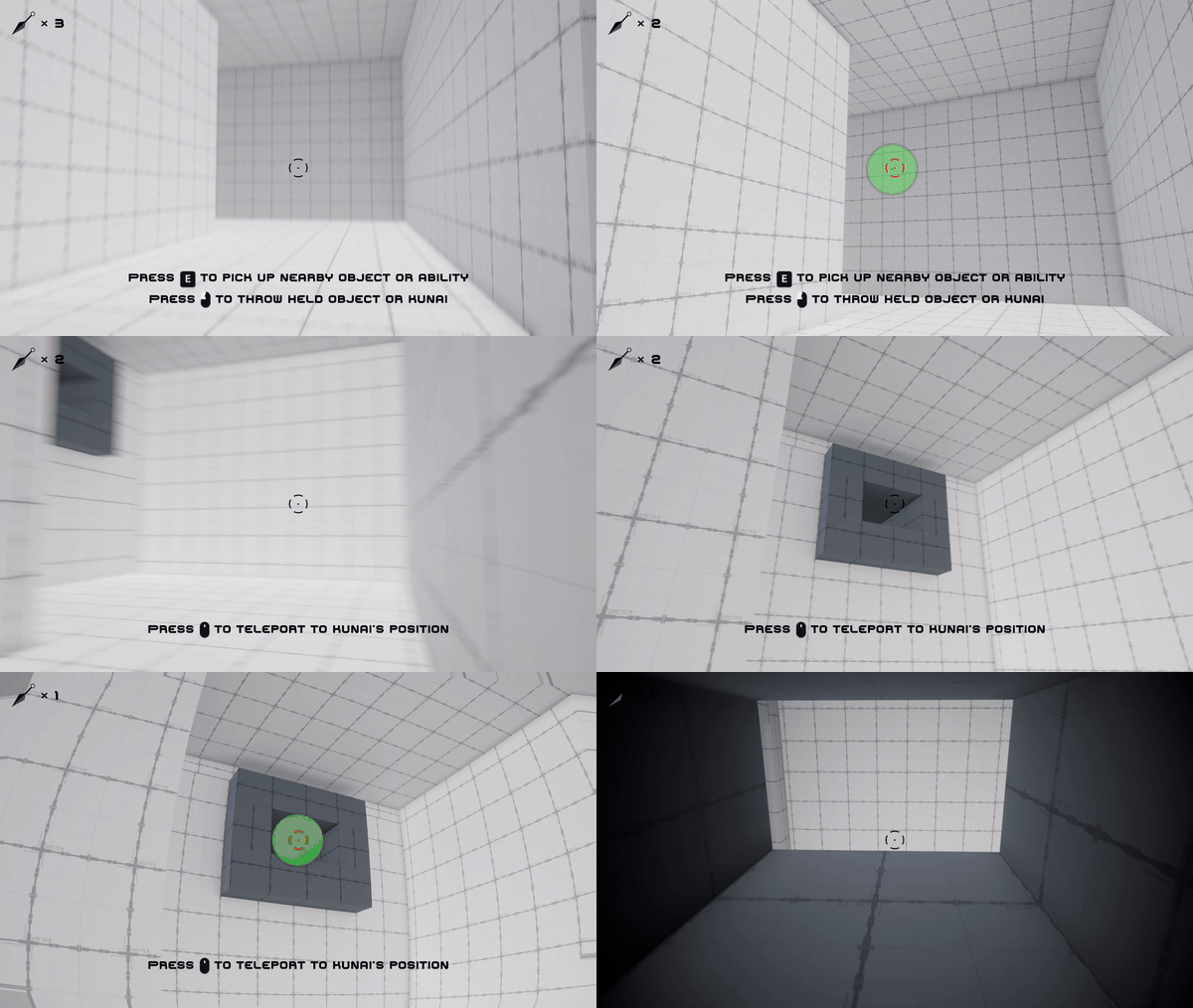
Teleportation is the absolute core of the game, and it has to hold up against all three pillars simultaneously: the warp has to feel weighty and instant (Satisfaction in Execution); teleportation as a mechanic has to be supported for all different types of scenarios, whether it is puzzles, stealth, combat, or traversal, and yield consistent feedback (No Single Key); and it has to support interactions and combinations with other objects so players can chain it into solutions that weren't individually scripted (Systems That Combine).
Teleportation is the absolute core of the game, and it has to hold up against all three pillars simultaneously: the warp has to feel weighty and instant (Satisfaction in Execution); teleportation as a mechanic has to be supported for all different types of scenarios, whether it is puzzles, stealth, combat, or traversal, and yield consistent feedback (No Single Key); and it has to support interactions and combinations with other objects so players can chain it into solutions that weren't individually scripted (Systems That Combine).
Teleportation is the absolute core of the game, and it has to hold up against all three pillars simultaneously: the warp has to feel weighty and instant (Satisfaction in Execution); teleportation as a mechanic has to be supported for all different types of scenarios, whether it is puzzles, stealth, combat, or traversal, and yield consistent feedback (No Single Key); and it has to support interactions and combinations with other objects so players can chain it into solutions that weren't individually scripted (Systems That Combine).
Rules
Rules
Rules
When teleport, warps directly to the target's position
Teleport can only be applied to kunais placed in the level
Kunais after teleportation is destroyed and lost
Kunais that are not used can be retrieved
Any tagged object can be used for swap position, with a range limit the same as teleportation
Tagged objects will not be destroyed after swapping position
When teleport, warps directly to the target's position
Teleport can only be applied to kunais placed in the level
Kunais after teleportation is destroyed and lost
Kunais that are not used can be retrieved
Any tagged object can be used for swap position, with a range limit the same as teleportation
Tagged objects will not be destroyed after swapping position
When teleport, warps directly to the target's position
Teleport can only be applied to kunais placed in the level
Kunais after teleportation is destroyed and lost
Kunais that are not used can be retrieved
Any tagged object can be used for swap position, with a range limit the same as teleportation
Tagged objects will not be destroyed after swapping position
DESIGN DECISION 1: DUAL MODE TELEPORT DETECTION
DESIGN DECISION 1: DUAL MODE TELEPORT DETECTION
Problem
Problem
Problem
A single detection method forces a tradeoff the player shouldn't feel. Screen-space proximity alone fails on large or close objects; a pure raycast fails on anything off-center. Either failure reads as "the game didn't register my input," quietly removing one of the player's valid approaches mid-encounter.
A single detection method forces a tradeoff the player shouldn't feel. Screen-space proximity alone fails on large or close objects; a pure raycast fails on anything off-center. Either failure reads as "the game didn't register my input," quietly removing one of the player's valid approaches mid-encounter.
A single detection method forces a tradeoff the player shouldn't feel. Screen-space proximity alone fails on large or close objects; a pure raycast fails on anything off-center. Either failure reads as "the game didn't register my input," quietly removing one of the player's valid approaches mid-encounter.
Decision
Decision
Decision
Run both, screen-space proximity as the primary path, with a per-collider raycast fallback for edge cases. The player never sees the seam; targeting simply always works, whether they're mid-puzzle, traversing, or in combat, directly serving No Single Solution.
Run both, screen-space proximity as the primary path, with a per-collider raycast fallback for edge cases. The player never sees the seam; targeting simply always works, whether they're mid-puzzle, traversing, or in combat, directly serving No Single Solution.
Run both, screen-space proximity as the primary path, with a per-collider raycast fallback for edge cases. The player never sees the seam; targeting simply always works, whether they're mid-puzzle, traversing, or in combat, directly serving No Single Solution.
if ((Vector2.SqrMagnitude(screenPointPos - centerPoint) <= Mathf.Pow(detectionRadius, 2)
    && Vector3.SqrMagnitude(target.transform.position - transform.position) <= Mathf.Pow(detectionDistance, 2))
    || target.GetComponentsInChildren<Collider>()
        .Aggregate(false, (sum, collider) => collider.Raycast(
            new Ray(Camera.main.transform.position, Camera.main.transform.forward),
            out _, detectionDistance) || sum
if ((Vector2.SqrMagnitude(screenPointPos - centerPoint) <= Mathf.Pow(detectionRadius, 2)
    && Vector3.SqrMagnitude(target.transform.position - transform.position) <= Mathf.Pow(detectionDistance, 2))
    || target.GetComponentsInChildren<Collider>()
        .Aggregate(false, (sum, collider) => collider.Raycast(
            new Ray(Camera.main.transform.position, Camera.main.transform.forward),
            out _, detectionDistance) || sum
Iteration
Iteration
Iteration
This went through two failed single-method versions before landing on the combined approach. The first version used only a raycast paired with a targeting ring that changes color when a valid object is detected, but raycasts (and spherecasts) proved unreliable at range, aiming dead-center at a distant kunai would frequently miss detection entirely, which confused playtesters who felt like the game wasn't registering an obviously correct shot. The team switched to screen-space proximity detection to fix that, but this introduced the opposite problem: it requires an object's center/origin to fall within the targeting ring, so anything too close to the player (where the object's screen footprint is large but its center may be off to the side) failed to detect. Combining both approaches resolved both failure modes at once.
This went through two failed single-method versions before landing on the combined approach. The first version used only a raycast paired with a targeting ring that changes color when a valid object is detected, but raycasts (and spherecasts) proved unreliable at range, aiming dead-center at a distant kunai would frequently miss detection entirely, which confused playtesters who felt like the game wasn't registering an obviously correct shot. The team switched to screen-space proximity detection to fix that, but this introduced the opposite problem: it requires an object's center/origin to fall within the targeting ring, so anything too close to the player (where the object's screen footprint is large but its center may be off to the side) failed to detect. Combining both approaches resolved both failure modes at once.
This went through two failed single-method versions before landing on the combined approach. The first version used only a raycast paired with a targeting ring that changes color when a valid object is detected, but raycasts (and spherecasts) proved unreliable at range, aiming dead-center at a distant kunai would frequently miss detection entirely, which confused playtesters who felt like the game wasn't registering an obviously correct shot. The team switched to screen-space proximity detection to fix that, but this introduced the opposite problem: it requires an object's center/origin to fall within the targeting ring, so anything too close to the player (where the object's screen footprint is large but its center may be off to the side) failed to detect. Combining both approaches resolved both failure modes at once.
Outcome
Outcome
Outcome
Targeting holds up across the full range of encounter scenarios, near or far, without requiring the player to reposition just to get a valid target, directly resolving the exact confusion playtesters reported with each single-method version.
Targeting holds up across the full range of encounter scenarios, near or far, without requiring the player to reposition just to get a valid target, directly resolving the exact confusion playtesters reported with each single-method version.
Targeting holds up across the full range of encounter scenarios, near or far, without requiring the player to reposition just to get a valid target, directly resolving the exact confusion playtesters reported with each single-method version.
DESIGN DECISION 2: SWAP POSITIONS INSTEAD OF TELEPORT FOR TAGGED TARGETS
DESIGN DECISION 2: SWAP POSITIONS INSTEAD OF TELEPORT FOR TAGGED TARGETS
Problem
Problem
Problem
Once a target is tagged, the obvious approach is to have the player simply teleport to that target's location, mirroring the plain kunai-travel mechanic. But that treats tagged interactables (enemies, throwables) as equivalent to static ones, which undersells what tagging actually offers and doesn't compensate the player for the real risk of having tagged the target ahead of time, exposed, before combat gets chaotic.
Once a target is tagged, the obvious approach is to have the player simply teleport to that target's location, mirroring the plain kunai-travel mechanic. But that treats tagged interactables (enemies, throwables) as equivalent to static ones, which undersells what tagging actually offers and doesn't compensate the player for the real risk of having tagged the target ahead of time, exposed, before combat gets chaotic.
Once a target is tagged, the obvious approach is to have the player simply teleport to that target's location, mirroring the plain kunai-travel mechanic. But that treats tagged interactables (enemies, throwables) as equivalent to static ones, which undersells what tagging actually offers and doesn't compensate the player for the real risk of having tagged the target ahead of time, exposed, before combat gets chaotic.
Decision
Decision
Decision
Tagged targets swap positions with the player instead of the player simply traveling to them. This is a meaningfully different mechanic, not a cosmetic variant, it moves both the player and the target simultaneously, offering far more tactical versatility (repositioning an enemy out of cover, escaping a surrounded position, pulling a throwable to you while displacing yourself) than a one-way teleport ever could.
Tagged targets swap positions with the player instead of the player simply traveling to them. This is a meaningfully different mechanic, not a cosmetic variant, it moves both the player and the target simultaneously, offering far more tactical versatility (repositioning an enemy out of cover, escaping a surrounded position, pulling a throwable to you while displacing yourself) than a one-way teleport ever could.
Tagged targets swap positions with the player instead of the player simply traveling to them. This is a meaningfully different mechanic, not a cosmetic variant, it moves both the player and the target simultaneously, offering far more tactical versatility (repositioning an enemy out of cover, escaping a surrounded position, pulling a throwable to you while displacing yourself) than a one-way teleport ever could.
if (closestTarget.layer == LayerMask.NameToLayer("Kunai")) {
    StartCoroutine(Teleport(closestTarget));
} else if (closestTarget.layer == LayerMask.NameToLayer("Tagged")) {
    GameObject temp = new GameObject();
    temp.transform.position = gameObject.transform.position;
    temp.transform.rotation = gameObject.transform.rotation;
    StartCoroutine(SwapLocations(closestTarget, temp
if (closestTarget.layer == LayerMask.NameToLayer("Kunai")) {
    StartCoroutine(Teleport(closestTarget));
} else if (closestTarget.layer == LayerMask.NameToLayer("Tagged")) {
    GameObject temp = new GameObject();
    temp.transform.position = gameObject.transform.position;
    temp.transform.rotation = gameObject.transform.rotation;
    StartCoroutine(SwapLocations(closestTarget, temp
Iteration
Iteration
Swap was the design from the moment tagging existed as a concept, there wasn't an earlier travel-only version that got replaced. The reasoning was clear from the start: a tagged target deserved a mechanically distinct payoff from an untagged one (like a kunai), otherwise tagging would just be an extra step for no real benefit.
Swap was the design from the moment tagging existed as a concept, there wasn't an earlier travel-only version that got replaced. The reasoning was clear from the start: a tagged target deserved a mechanically distinct payoff from an untagged one (like a kunai), otherwise tagging would just be an extra step for no real benefit.
Outcome
Outcome
Outcome
Swapping gives tagging real strategic weight, the upfront risk of tagging a target is repaid with a mechanic that's strictly more versatile than travel alone, reinforcing Systems That Combine.
Swapping gives tagging real strategic weight, the upfront risk of tagging a target is repaid with a mechanic that's strictly more versatile than travel alone, reinforcing Systems That Combine.
Swapping gives tagging real strategic weight, the upfront risk of tagging a target is repaid with a mechanic that's strictly more versatile than travel alone, reinforcing Systems That Combine.
DESIGN DECISION 3: TELEPORTATION SHOULD FEEL POWERFUL
DESIGN DECISION 3: TELEPORTATION SHOULD FEEL POWERFUL
Problem
Problem
Problem
Generic ability feedback wouldn't be enough for teleportation specifically. The fantasy is tearing a hole in space and stepping through it, if the feedback reads as just another ability effect, the mechanic loses the "ripping the fabric of space-time apart" feeling that's central to why teleportation is the game's core verb.
Generic ability feedback wouldn't be enough for teleportation specifically. The fantasy is tearing a hole in space and stepping through it, if the feedback reads as just another ability effect, the mechanic loses the "ripping the fabric of space-time apart" feeling that's central to why teleportation is the game's core verb.
Generic ability feedback wouldn't be enough for teleportation specifically. The fantasy is tearing a hole in space and stepping through it, if the feedback reads as just another ability effect, the mechanic loses the "ripping the fabric of space-time apart" feeling that's central to why teleportation is the game's core verb.
Decision
Decision
Decision
Build feedback (lens distortion ramping up before the teleport executes, then back down after) specifically tuned to teleportation, so the moment reads as uniquely powerful and violent to reality itself, not just "an ability happened."
Build feedback (lens distortion ramping up before the teleport executes, then back down after) specifically tuned to teleportation, so the moment reads as uniquely powerful and violent to reality itself, not just "an ability happened."
Build feedback (lens distortion ramping up before the teleport executes, then back down after) specifically tuned to teleportation, so the moment reads as uniquely powerful and violent to reality itself, not just "an ability happened."
while (lensDistortion.intensity.value < maxLensDistortion) {
    lensDistortion.intensity.value += Time.deltaTime / Time.timeScale * distortionSpeed;
    yield return null;
}
UpdateRotation(closestTarget);
TeleportObjects(gameObject, closestTarget);
...
while (lensDistortion.intensity.value > 0) {
    lensDistortion.intensity.value -= Time.deltaTime / Time.timeScale * distortionSpeed;
    yield return null
while (lensDistortion.intensity.value < maxLensDistortion) {
    lensDistortion.intensity.value += Time.deltaTime / Time.timeScale * distortionSpeed;
    yield return null;
}
UpdateRotation(closestTarget);
TeleportObjects(gameObject, closestTarget);
...
while (lensDistortion.intensity.value > 0) {
    lensDistortion.intensity.value -= Time.deltaTime / Time.timeScale * distortionSpeed;
    yield return null
Iteration
Iteration
Iteration
The earliest version had no distortion VFX at all, the player was simply moved to the destination instantaneously. This felt disorienting rather than powerful, the teleport happened too fast for the player to actually register what occurred, it read more like a bug or a camera glitch than an intentional ability. Adding the lens distortion ramp gave the moment a beginning, middle, and end the player could actually perceive, which both grounded the teleport in something that felt natural to experience and made it read as cool and powerful rather than jarring.
The earliest version had no distortion VFX at all, the player was simply moved to the destination instantaneously. This felt disorienting rather than powerful, the teleport happened too fast for the player to actually register what occurred, it read more like a bug or a camera glitch than an intentional ability. Adding the lens distortion ramp gave the moment a beginning, middle, and end the player could actually perceive, which both grounded the teleport in something that felt natural to experience and made it read as cool and powerful rather than jarring.
The earliest version had no distortion VFX at all, the player was simply moved to the destination instantaneously. This felt disorienting rather than powerful, the teleport happened too fast for the player to actually register what occurred, it read more like a bug or a camera glitch than an intentional ability. Adding the lens distortion ramp gave the moment a beginning, middle, and end the player could actually perceive, which both grounded the teleport in something that felt natural to experience and made it read as cool and powerful rather than jarring.
Outcome
Outcome
Outcome
Teleportation now gives the player clear, felt confirmation that it actually happened, turning what was originally a disorienting instant snap into a moment that reads as deliberate and powerful, directly reinforcing Satisfaction in Execution.
Teleportation now gives the player clear, felt confirmation that it actually happened, turning what was originally a disorienting instant snap into a moment that reads as deliberate and powerful, directly reinforcing Satisfaction in Execution.
Teleportation now gives the player clear, felt confirmation that it actually happened, turning what was originally a disorienting instant snap into a moment that reads as deliberate and powerful, directly reinforcing Satisfaction in Execution.
#2: DISMEMBERMENT
#2: DISMEMBERMENT
#2: DISMEMBERMENT
OVERVIEW
OVERVIEW


Design Intent
Design Intent
Design Intent
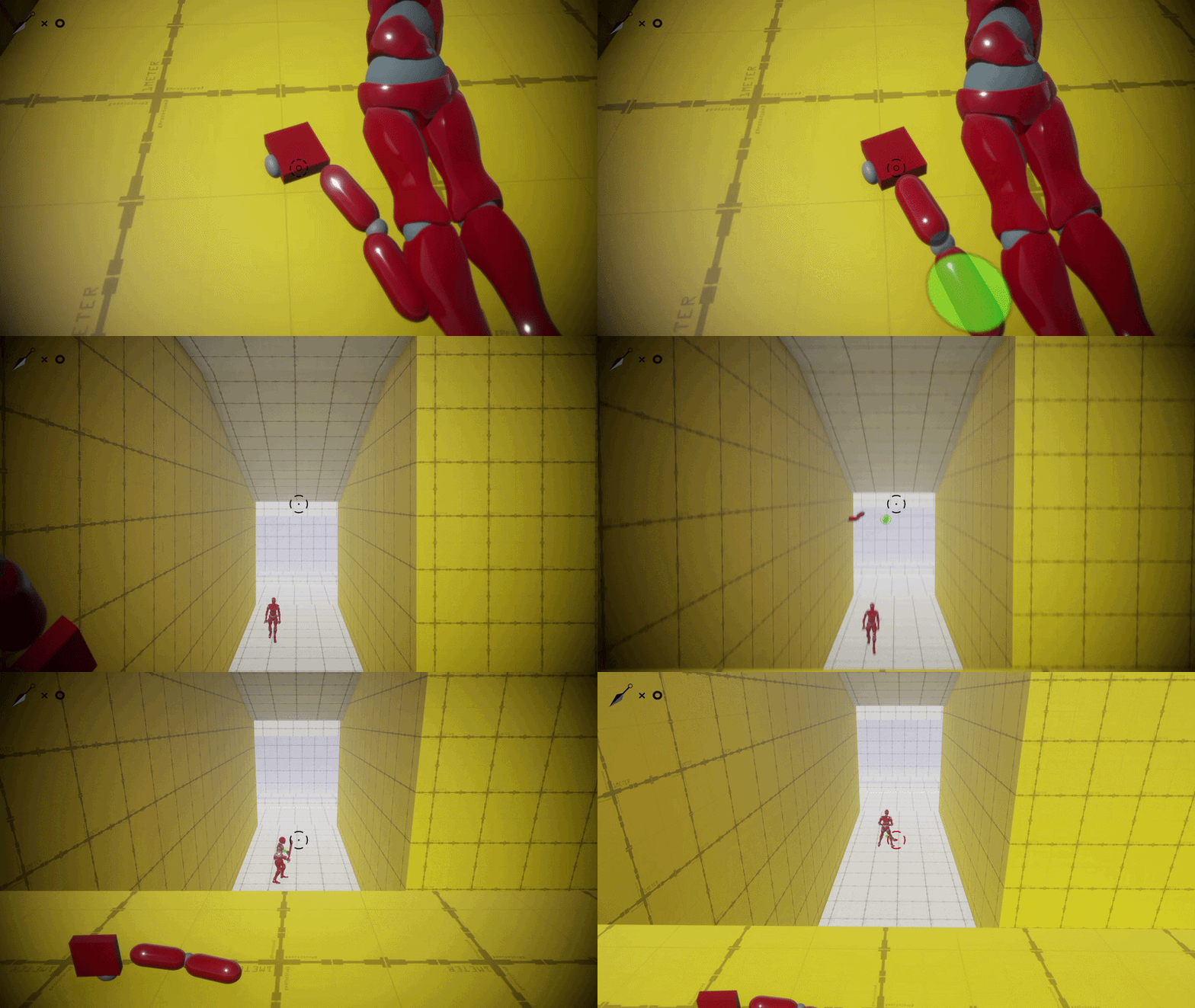
Dismemberment has to land as genuinely satisfying combat feedback — not a health-bar reduction with a different animation (Satisfaction in Execution). And the severed limb can't be a cosmetic payoff that disappears after the kill — it needs to persist as a usable object: a teleport target, a stealth distraction, or a tool against other enemies (Systems That Combine, and by extension No Single Key, since it opens combat, stealth, and traversal solutions from the same moment).
Dismemberment has to land as genuinely satisfying combat feedback — not a health-bar reduction with a different animation (Satisfaction in Execution). And the severed limb can't be a cosmetic payoff that disappears after the kill — it needs to persist as a usable object: a teleport target, a stealth distraction, or a tool against other enemies (Systems That Combine, and by extension No Single Key, since it opens combat, stealth, and traversal solutions from the same moment).
Dismemberment has to land as genuinely satisfying combat feedback — not a health-bar reduction with a different animation (Satisfaction in Execution). And the severed limb can't be a cosmetic payoff that disappears after the kill — it needs to persist as a usable object: a teleport target, a stealth distraction, or a tool against other enemies (Systems That Combine, and by extension No Single Key, since it opens combat, stealth, and traversal solutions from the same moment).
Rules
Rules
Rules
All characters die in 1 hit (including the player), and dismemberment occurs if a valid limb is on the attack hitbox
Severed limbs persist in the world as physical objects (not despawned) and are eligible for tagging like any other object
All characters die in 1 hit (including the player), and dismemberment occurs if a valid limb is on the attack hitbox
Severed limbs persist in the world as physical objects (not despawned) and are eligible for tagging like any other object
All characters die in 1 hit (including the player), and dismemberment occurs if a valid limb is on the attack hitbox
Severed limbs persist in the world as physical objects (not despawned) and are eligible for tagging like any other object
DESIGN DECISION 1: SEVERED LIMB AS MULTI-PURPOSE INTERACTABLE
DESIGN DECISION 1: SEVERED LIMB AS MULTI-PURPOSE INTERACTABLE
Problem
Problem
Problem
If dismemberment only served combat, it would be a one-off spectacle disconnected from everything else the player can do. The goal was for a single combat action to open up options across systems that don't normally touch each other.
If dismemberment only served combat, it would be a one-off spectacle disconnected from everything else the player can do. The goal was for a single combat action to open up options across systems that don't normally touch each other.
If dismemberment only served combat, it would be a one-off spectacle disconnected from everything else the player can do. The goal was for a single combat action to open up options across systems that don't normally touch each other.
Decision
Decision
Decision
Severed limbs go through the same tagging process as any other teleportable object, but their utility isn't limited to travel: a severed limb can be thrown as a distraction to pull enemy attention, tagged as a teleport target to reposition, or used against other enemies entirely — all from the same object, generated the same way, in the same moment.
Severed limbs go through the same tagging process as any other teleportable object, but their utility isn't limited to travel: a severed limb can be thrown as a distraction to pull enemy attention, tagged as a teleport target to reposition, or used against other enemies entirely — all from the same object, generated the same way, in the same moment.
Severed limbs go through the same tagging process as any other teleportable object, but their utility isn't limited to travel: a severed limb can be thrown as a distraction to pull enemy attention, tagged as a teleport target to reposition, or used against other enemies entirely — all from the same object, generated the same way, in the same moment.
Vector2 target_screen_pos = Camera.main.WorldToScreenPoint(target.transform.position);
if ((Vector2.SqrMagnitude(target_screen_pos - centerPoint) <= Mathf.Pow(detectionRadius, 2)
    && Vector3.SqrMagnitude(...) <= Mathf.Pow(detectionDistance, 2))
    || target.GetComponentsInChildren<Collider>()
        .Aggregate(false, (sum, collider) => collider.Raycast
Vector2 target_screen_pos = Camera.main.WorldToScreenPoint(target.transform.position);
if ((Vector2.SqrMagnitude(target_screen_pos - centerPoint) <= Mathf.Pow(detectionRadius, 2)
    && Vector3.SqrMagnitude(...) <= Mathf.Pow(detectionDistance, 2))
    || target.GetComponentsInChildren<Collider>()
        .Aggregate(false, (sum, collider) => collider.Raycast
Iteration
Iteration
Iteration
Originally, this wasn't the plan and the player had to rely on either kunais or tagging other interactable objects in the level, such as prop boxes, to teleport. However, this goes against the philosophy that all levels/challenges should have no fixed solution. To combat that, I tried by giving more meaning to the enemies, not only as a hostile unit that tries to kill the player, but also reward the player through safety and literally giving them a hand at progressing through future challenges.
Originally, this wasn't the plan and the player had to rely on either kunais or tagging other interactable objects in the level, such as prop boxes, to teleport. However, this goes against the philosophy that all levels/challenges should have no fixed solution. To combat that, I tried by giving more meaning to the enemies, not only as a hostile unit that tries to kill the player, but also reward the player through safety and literally giving them a hand at progressing through future challenges.
Originally, this wasn't the plan and the player had to rely on either kunais or tagging other interactable objects in the level, such as prop boxes, to teleport. However, this goes against the philosophy that all levels/challenges should have no fixed solution. To combat that, I tried by giving more meaning to the enemies, not only as a hostile unit that tries to kill the player, but also reward the player through safety and literally giving them a hand at progressing through future challenges.
Outcome
Outcome
Outcome
One combat action — cleanly cutting off a limb — now feeds directly into stealth (distraction), traversal (teleport target), and further combat (thrown weapon or additional target). The clearest proof in the game of Systems That Combine, and the strongest evidence for No Single Key: the same kill can lead into a stealth, combat, or repositioning route depending entirely on what the player chooses to do with the result.
One combat action — cleanly cutting off a limb — now feeds directly into stealth (distraction), traversal (teleport target), and further combat (thrown weapon or additional target). The clearest proof in the game of Systems That Combine, and the strongest evidence for No Single Key: the same kill can lead into a stealth, combat, or repositioning route depending entirely on what the player chooses to do with the result.
One combat action — cleanly cutting off a limb — now feeds directly into stealth (distraction), traversal (teleport target), and further combat (thrown weapon or additional target). The clearest proof in the game of Systems That Combine, and the strongest evidence for No Single Key: the same kill can lead into a stealth, combat, or repositioning route depending entirely on what the player chooses to do with the result.
DESIGN DECISION 2: PRE-BUILT LIMB SWAP WITH SYNCED FEEDBACK
DESIGN DECISION 2: PRE-BUILT LIMB SWAP WITH SYNCED FEEDBACK
Problem
Problem
Problem
True runtime mesh cutting is expensive and fragile to get looking clean across arbitrary hit angles, but the payoff still needed to feel physically real and immediate. The attack VFX also had to land in sync with the actual cut, or the hit would read as visually disconnected from its consequence even with good physics underneath.
True runtime mesh cutting is expensive and fragile to get looking clean across arbitrary hit angles, but the payoff still needed to feel physically real and immediate. The attack VFX also had to land in sync with the actual cut, or the hit would read as visually disconnected from its consequence even with good physics underneath.
True runtime mesh cutting is expensive and fragile to get looking clean across arbitrary hit angles, but the payoff still needed to feel physically real and immediate. The attack VFX also had to land in sync with the actual cut, or the hit would read as visually disconnected from its consequence even with good physics underneath.
Decision
Decision
Decision
Use pre-built severable limb pieces swapped in on hit rather than cutting the mesh live, apply ragdoll physics to the detached piece, and align the attack VFX to the same trigger point as the limb swap, so the visual flourish and the physical payoff read as one causal moment.
Use pre-built severable limb pieces swapped in on hit rather than cutting the mesh live, apply ragdoll physics to the detached piece, and align the attack VFX to the same trigger point as the limb swap, so the visual flourish and the physical payoff read as one causal moment.
Use pre-built severable limb pieces swapped in on hit rather than cutting the mesh live, apply ragdoll physics to the detached piece, and align the attack VFX to the same trigger point as the limb swap, so the visual flourish and the physical payoff read as one causal moment.
else if (source.TryGetComponent(out NavMeshAgent agent)) {
    agent.enabled = false;
    source.transform.position = target.transform.position + Vector3.down;
    if (NavMesh.SamplePosition(source.transform.position, out _, 1f, NavMesh.AllAreas)) {
        agent.enabled = true;
    } else {
        teleportables.Remove(source);
        source.layer = LayerMask.NameToLayer("Enemy"
else if (source.TryGetComponent(out NavMeshAgent agent)) {
    agent.enabled = false;
    source.transform.position = target.transform.position + Vector3.down;
    if (NavMesh.SamplePosition(source.transform.position, out _, 1f, NavMesh.AllAreas)) {
        agent.enabled = true;
    } else {
        teleportables.Remove(source);
        source.layer = LayerMask.NameToLayer("Enemy"
Iteration
Iteration
Iteration
The initial reaction to dismemberment system was a runtime mesh cutter to give player more freedom in ways they can cut an enemy, but seeing how performance-heavy and how easy it is to go out of control, I quickly rolled back into prebuilt limbs. The early version had a shared root problem across three symptoms — janky ragdoll physics, a limb swap not tightly synced to hit registration, and VFX playing too early or too late relative to the cut. All three were fixed against the same timing anchor rather than tuned in isolation.
The initial reaction to dismemberment system was a runtime mesh cutter to give player more freedom in ways they can cut an enemy, but seeing how performance-heavy and how easy it is to go out of control, I quickly rolled back into prebuilt limbs. The early version had a shared root problem across three symptoms — janky ragdoll physics, a limb swap not tightly synced to hit registration, and VFX playing too early or too late relative to the cut. All three were fixed against the same timing anchor rather than tuned in isolation.
The initial reaction to dismemberment system was a runtime mesh cutter to give player more freedom in ways they can cut an enemy, but seeing how performance-heavy and how easy it is to go out of control, I quickly rolled back into prebuilt limbs. The early version had a shared root problem across three symptoms — janky ragdoll physics, a limb swap not tightly synced to hit registration, and VFX playing too early or too late relative to the cut. All three were fixed against the same timing anchor rather than tuned in isolation.
Outcome
Outcome
Outcome
Once tuned, the limb detaches and flies off at the angle dictated by the hit, ragdolling naturally as the enemy dies. The cut reads as a single, satisfying consequence of the attack.
Once tuned, the limb detaches and flies off at the angle dictated by the hit, ragdolling naturally as the enemy dies. The cut reads as a single, satisfying consequence of the attack.
Once tuned, the limb detaches and flies off at the angle dictated by the hit, ragdolling naturally as the enemy dies. The cut reads as a single, satisfying consequence of the attack.
#3: INTERACTION & TAGGING
#3: INTERACTION & TAGGING
#3: INTERACTION & TAGGING
OVERVIEW
OVERVIEW
Design Intent
Design Intent
Design Intent
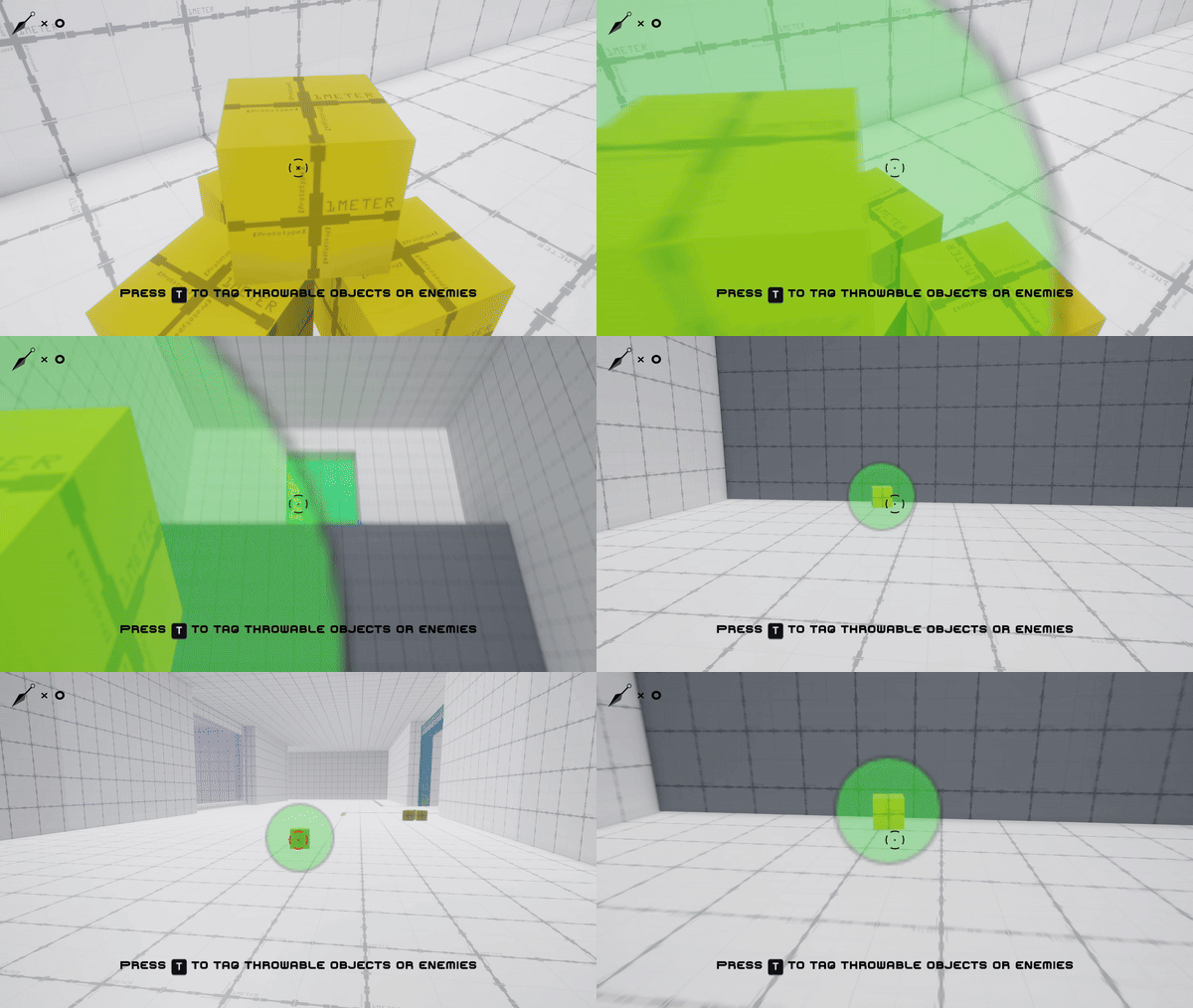
Every mechanic that lets the player combine tools — teleport-swap with an enemy, teleport to a kunai, tag a severed limb — needs a shared way to mark "this object is currently interactable in this specific way." The goal wasn't the tagging mechanic itself; it was making sure adding a new interactable type later wouldn't require touching the teleport code at all (Systems That Combine).
Every mechanic that lets the player combine tools — teleport-swap with an enemy, teleport to a kunai, tag a severed limb — needs a shared way to mark "this object is currently interactable in this specific way." The goal wasn't the tagging mechanic itself; it was making sure adding a new interactable type later wouldn't require touching the teleport code at all (Systems That Combine).
Every mechanic that lets the player combine tools — teleport-swap with an enemy, teleport to a kunai, tag a severed limb — needs a shared way to mark "this object is currently interactable in this specific way." The goal wasn't the tagging mechanic itself; it was making sure adding a new interactable type later wouldn't require touching the teleport code at all (Systems That Combine).
Rules
Rules
Rules
Tagged objects will have a visible silhouette when obscured by other objects, maintaining visibility
Any throwable objects can be tagged when in close proximity
Tagged objects are permanently tagged and infinitely reusable
Tagged objects will have a visible silhouette when obscured by other objects, maintaining visibility
Any throwable objects can be tagged when in close proximity
Tagged objects are permanently tagged and infinitely reusable
Tagged objects will have a visible silhouette when obscured by other objects, maintaining visibility
Any throwable objects can be tagged when in close proximity
Tagged objects are permanently tagged and infinitely reusable
DESIGN DECISION: TAGGING FLAGGED THROUGH LAYER SYSTEM
DESIGN DECISION: TAGGING FLAGGED THROUGH LAYER SYSTEM
Problem
Problem
Problem
The obvious approach is a dedicated list or dictionary tracking which objects are currently tagged. But that couples every system that wants to know "is this tagged?" directly to however that data structure is maintained — every new interactable type would mean touching multiple systems again.
The obvious approach is a dedicated list or dictionary tracking which objects are currently tagged. But that couples every system that wants to know "is this tagged?" directly to however that data structure is maintained — every new interactable type would mean touching multiple systems again.
The obvious approach is a dedicated list or dictionary tracking which objects are currently tagged. But that couples every system that wants to know "is this tagged?" directly to however that data structure is maintained — every new interactable type would mean touching multiple systems again.
Decision
Decision
Decision
Use Unity's layer system as the tag state itself. An object is "tagged" when its layer is set to Tagged; teleportation branches purely on layer, with no knowledge of how the tag was applied. This is what let Dismemberment plug a completely new interactable type into the same teleport/tag pipeline without any changes to the teleport code.
Use Unity's layer system as the tag state itself. An object is "tagged" when its layer is set to Tagged; teleportation branches purely on layer, with no knowledge of how the tag was applied. This is what let Dismemberment plug a completely new interactable type into the same teleport/tag pipeline without any changes to the teleport code.
Use Unity's layer system as the tag state itself. An object is "tagged" when its layer is set to Tagged; teleportation branches purely on layer, with no knowledge of how the tag was applied. This is what let Dismemberment plug a completely new interactable type into the same teleport/tag pipeline without any changes to the teleport code.
// tagging: set layer directly, no separate tracked state
target.layer = LayerMask.NameToLayer("Tagged");
// teleport system: branches purely on layer
if (closestTarget.layer == LayerMask.NameToLayer("Tagged")) {
    StartCoroutine(SwapLocations(closestTarget, temp
// tagging: set layer directly, no separate tracked state
target.layer = LayerMask.NameToLayer("Tagged");
// teleport system: branches purely on layer
if (closestTarget.layer == LayerMask.NameToLayer("Tagged")) {
    StartCoroutine(SwapLocations(closestTarget, temp